Back to Portfolio

Headless Shopify · Case Study

DriveCraft —
Automotive Customization

A fictional automotive-interior accessories brand built to show how a headless Shopify storefront can make shopping easier, customization clearer, and the backend simpler to manage — without overwhelming buyers with technical decisions they're not ready to make.

Headless Shopify TanStack Start Consumer Psychology Lovable Prototype CRO

No password needed — the demo is publicly accessible.

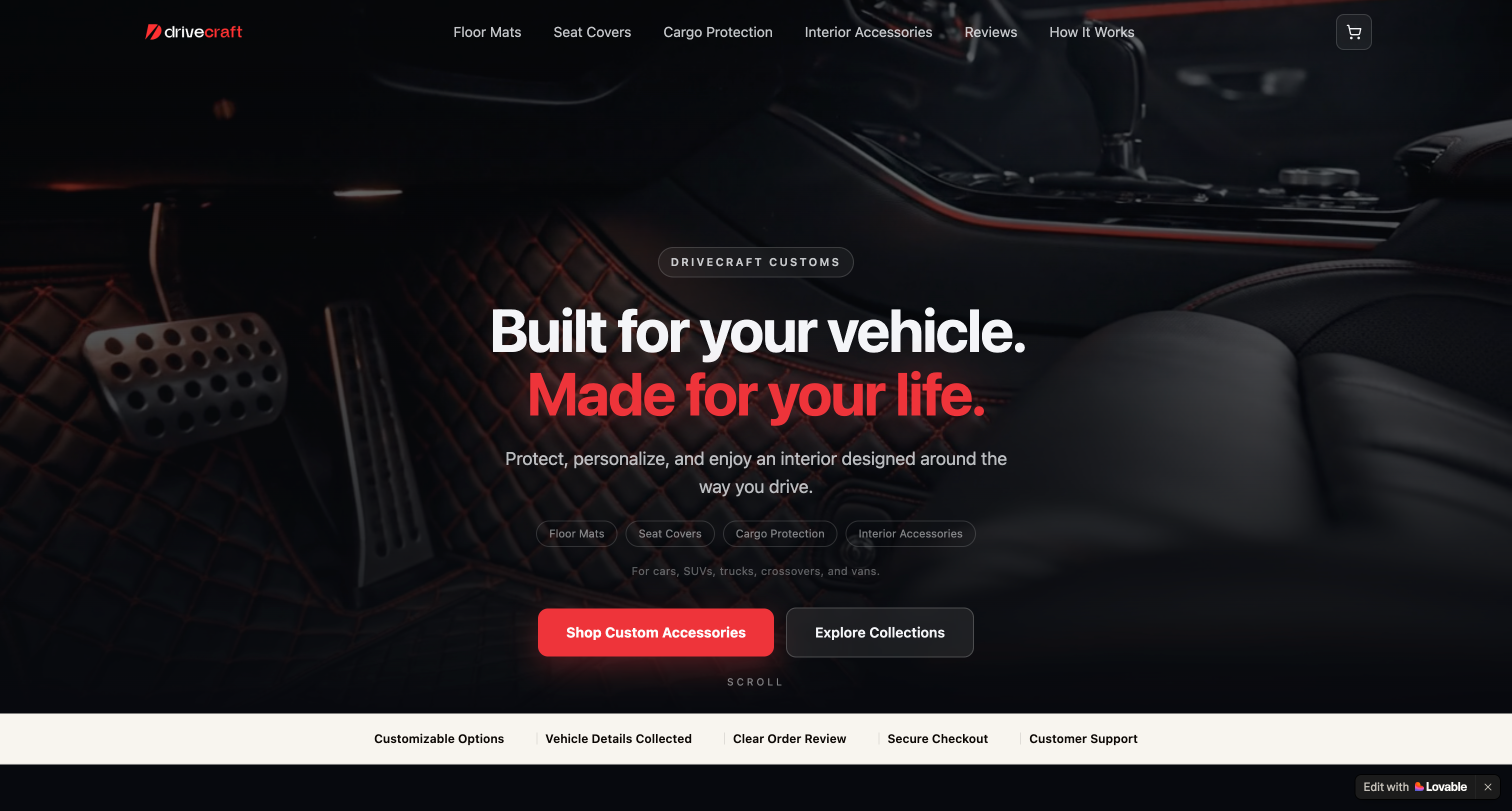
DriveCraft headless Shopify storefront
Live Demo
DriveCraft Customs
Headless Shopify storefront — automotive interior accessories with guided configuration.
Publicly accessible — no password required
Open Live Demo →
The Business Problem

From a parts catalog to a premium interior brand.

The early design leaned on dark backgrounds, repetitive cards, technical fitment language, and floor-mat imagery. It looked credible, but felt more like a catalog than a brand — and it immediately asked visitors for effort they were not yet ready to give.

The central question became: how can customers discover what they want before the storefront asks for technical vehicle details?

Friction 01

Vehicle details asked too early

A homepage Year, Make, and Model selector asked for effort before visitors understood the catalog or felt any desire for a product.

Friction 02

Floor-mat tunnel vision

Messaging and proof repeatedly returned to the floor area, making a broader interior-accessories brand feel like a single-product business.

Friction 03

One journey for everyone

Custom seat covers, vehicle-compatible products, and ordinary cleaners don't need the same purchase interface — but the storefront treated them identically.

See how the journey was redesigned → A publicly accessible demo — explore the full storefront experience.
Open Live Demo →
Core Hypothesis

Let customers fall in love with the product before asking for vehicle details.

I moved Year, Make, and Model away from the homepage and treated those fields as order customization — collected only on the products that actually need them. The homepage now focuses on aspiration, product discovery, lifestyle, and confidence. Vehicle information appears only at the relevant step.

The reframe

Most automotive stores open with a compatibility question. DriveCraft opens with desire. The difference is that one asks customers to solve a problem, and the other makes them want the product first.

From Rapid Prototype to Structured Storefront

The right tool for each phase.

I began DriveCraft in Lovable because it allowed me to test the visual direction and ecommerce journey quickly. Early iterations revealed several important problems: vehicle information was asked too soon, the brand appeared too narrowly focused on floor mats, and several navigation paths led nowhere.

Once the direction was validated, I rebuilt the storefront using TanStack Start, React, and TypeScript — giving me full control over routing, Shopify data, product filtering, configuration logic, responsive behavior, accessibility, and long-term maintainability.

Phase A · Lovable

01 — Prototype

Built the initial visual direction and ecommerce journey in Lovable to test the concept quickly and surface problems early.

Phase A · Lovable

02 — Identify friction

Discovered the homepage asked for vehicle details too soon, category coverage was too narrow, and navigation had dead ends.

Phase B · Strategy

03 — Restructure

Moved vehicle details into individual product steps, broadened the brand, and defined four distinct purchase journeys.

Phase C · Custom Build

04 — Rebuild

Replaced the prototype with a custom TanStack Start application for deeper control over routing, filtering, and architecture.

Phase C · Custom Build

05 — Connect Shopify

Integrated Shopify's Storefront API for products, variants, pricing, cart, and checkout. Structured reusable data with metafields.

Phase C · Custom Build

06 — Refine and test

Addressed responsive behavior, accessibility, configuration edge cases, and navigation integrity across every entry point.

The Customer Journey

One storefront, four purchase journeys.

The product page is a reusable system controlled by Shopify. A single setting on the product record selects the correct experience — no separate pages or custom builds needed for each product type.

01

Standard

Cleaners, care kits, towels, and universal accessories. Simple quantity and add-to-cart — no configuration required.

02

Personalized

Products with color, stitching, custom text, or finish options that don't require vehicle information.

03

Vehicle Customized

Made-to-order mats, seat covers, and cargo liners. Collects vehicle details as production information alongside design choices.

04

Vehicle Compatible

Stocked products where the customer's vehicle confirms compatibility or selects the correct variant for their car.

Explore the four journeys in the live demo Browse Standard, Personalized, Vehicle Customized, and Vehicle Compatible products — all in one storefront.
Open Live Demo →
Homepage Direction

Discovery first. Configuration when relevant.

The homepage leads with aspiration, category discovery, lifestyle recommendations, style inspiration, product storytelling, and customer stories. Vehicle details never appear until a customer picks a product that needs them.

Consumer Psychology

Sell the transformation

The page speaks to pride of ownership, easier maintenance, personal expression, and the feeling of opening the door to a more intentional interior — before asking for anything in return.

Information Architecture

More than one path to discovery

Customers can browse by product category, lifestyle need, interior style, or featured products — or use the assisted option when they're unsure what fits their vehicle.

Visual Rhythm

Editorial, not repetitive

Asymmetrical cards, cinematic sections, and varied compositions reduce the feeling of a generated template and support a premium brand impression.

Confidence

Help remains available

Customers can browse independently or use "Get Help Choosing" whenever compatibility or customization creates uncertainty — without leaving the page.

Signature Interaction

Shop an interior by identity.

The "Create an interior that feels like yours" section reframes discovery around moods — Luxury, Sport, Adventure, Minimal, Family, and Premium. It's intentionally different from category navigation: category shopping asks what customers need, while inspiration shopping asks how they want the interior to feel.

Each mood card links directly to a filtered catalog showing only the products that match that style. Shopify controls which products appear under each mood — meaning the business can update the catalog without rebuilding the page.

Try the mood discovery section See how Luxury, Sport, Minimal, and the other moods filter the catalog in the live demo.
Open Live Demo →
Navigation Design

Every click leads somewhere relevant.

Every category and style entry point — the main navigation, footer, hero section, best-sellers, and inspiration cards — opens a pre-filtered catalog rather than the full product list. The customer arrives at relevant results immediately, without searching.

Filtered Results

Not the full catalog

Clicking "Floor Mats" in the nav opens the catalog pre-filtered to floor mats. Clicking a style mood opens only matching products. No extra searching required.

Filters Combine

Style and category work together

A customer can browse by style mood and then narrow to a specific category — or vice versa. Changing one filter doesn't clear the other.

Shareable Views

Every filtered page is a real page

Every filtered catalog view can be bookmarked, shared, or copied as a link. The browser back button works correctly. Nothing is stored in hidden session memory.

Backend-Driven

Shopify controls product associations

Which products appear under each mood or category is controlled from Shopify admin. No separate filtered pages need to be created or maintained when the catalog changes.

Vehicle Details & Pricing

The customer's vehicle is saved with the order. Shopify controls the price.

For custom products, the customer enters the Year, Make, Model, and Trim of their vehicle. That information is saved with the order as a production note — so the manufacturer knows exactly which vehicle the product was made for.

The storefront maps the vehicle to a broad class — Sedan, SUV, or Pickup/Truck. The coverage set, vehicle class, and material choice together select the correct Shopify product variant and checkout price. The variant — not the storefront — controls what the customer pays.

A Toyota Corolla and a Honda Civic can share the same Sedan pricing class while retaining their own vehicle details on the order. There is no separate Shopify listing for every vehicle on the road.

See the configuration flow in action — step through a custom product and watch how vehicle details are collected at exactly the right moment.
Open Live Demo →
Configuration Flow

One step at a time. Only the steps that matter.

Custom products reveal only the next relevant decision. Standard products skip configuration entirely. Customers are never asked for information the product doesn't need.

Step 01

Your vehicle

Year, Make, Model, and Trim are collected only when the product requires them — as production information, not as a storefront filter.

Step 02

Coverage or set

Front Pair, Full Set, cargo coverage, or another product-specific package option.

Step 03

Material

A choice that affects pricing, connected to real Shopify variants managed from the Shopify admin.

Step 04

Style

Colors, stitching, and personalization options sourced from the Shopify backend — no hardcoded lists in the frontend.

Step 05

Review

A full configuration summary with edit controls and vehicle confirmation before anything enters the cart.

Checkout

Shopify cart

The selected variant and all configuration details pass into Shopify checkout. The business retains full control over checkout and fulfillment.

Try the configuration steps yourself Pick a custom product in the demo and walk through the step-by-step flow.
Open Live Demo →
Responsive Design

Designed for decisions on every screen.

Design Goals

What the storefront is designed to achieve.

These are intended outcomes and design goals — not measured production results. DriveCraft is a portfolio prototype built to demonstrate the strategic and implementation decisions behind a scalable headless shopping experience.

My Role

Strategy, prototyping, and directed implementation.

Product & CRO

Decision-journey design

I audited the storefront from the customer's perspective, identified cognitive and emotional friction, and reorganized the journey around discovery, desire, confidence, and product-level configuration — leading with aspiration and deferring complexity.

Lovable

Rapid prototyping

Lovable was ideal for moving quickly during discovery. I used it to test visual direction and ecommerce journey structure, identify friction points, and validate the overall approach before committing to a custom build.

AI-Assisted Dev

Architecture and directed build

As the product logic became more specialized, I directed a full rebuild using AI-assisted workflows — specifying the Shopify data model, routing behavior, filtering logic, responsive requirements, and QA criteria, and reviewing every decision and output.

Stack & Capabilities

Technical stack and working methods.

Rapid Prototyping Lovable Early Design Iteration Custom Application TanStack Start TanStack Router React 19 TypeScript Vite Commerce Backend Headless Shopify Storefront API Shopify Cart API Product Variants Metafields Metaobjects Strategy & Methods Consumer Psychology Conversion Optimization Information Architecture Progressive Disclosure Responsive Design Accessibility AI-Assisted Development QA & Troubleshooting
Optional Technical Read · For Developers & Hiring Managers

Under the hood.

This section covers the implementation decisions behind the business outcomes described above. The main case study is intentionally written for nontechnical readers — everything below is for developers or hiring managers who want to understand the architecture.


Routing & URL State

Both the style and category dimensions are encoded as URL search params on the /products route. TanStack Router's validateSearch defines the shape at the route level — { style: InteriorStyle | undefined, category: CategorySlug | undefined }. TypeScript will not compile if any <Link> to the catalog is missing either param, which enforces consistency across the navbar, footer, hero, best-sellers, and inspiration sections.

Category chips use TanStack Router's function-form search: search={(prev) => ({ style: prev.style, category: slug })}. This preserves the active style filter when the customer changes category. Both dimensions are independent and combinable without any client-side state management library.


Shopify Integration

Products, variants, prices, and availability are fetched via Shopify's Storefront API using a GraphQL query on the /products and /product/$handle routes. The frontend reads the custom.interior_styles metafield to determine style mood associations. If the metafield is absent, the frontend falls back to product tags so products remain filterable before metafields are fully configured.

Color and stitching options are Shopify metaobjects — reusable entries referenced by any product that needs them. Adding a new color in Shopify propagates to every product that references that metaobject without a code change.

Variant strategy: Vehicle details (Year, Make, Model, Trim), color, and stitching are saved as cart-line attributes, not Shopify variants. Native variants are reserved for choices that affect price, SKU, inventory, weight, or fulfillment. The vehicle is resolved to a pricing class (Sedan / SUV / Pickup/Truck), which — combined with Set and Material — selects the actual Shopify variant. This keeps the variant matrix manageable regardless of how many vehicle makes and models the business supports.

Application Architecture

TanStack Start

File-based routing with server loaders

The storefront uses TanStack Start (React 19, TypeScript, Vite) with file-based routing. Product pages use server-side data loading so Shopify data is available on first render without a client-side fetch waterfall.

Accessibility

Focus restoration on the help drawer

The help drawer tracks whichever button opened it using a mutable lastHelpTrigger ref, updated at click time. When the drawer closes, focus returns to that element — compliant with WCAG focus management guidelines.

Navigation Integrity

Footer audit

The footer was fully audited and rebuilt. All href="#" dead links, an unconnected newsletter form, unverified payment badge icons, and duplicate navigation columns were removed. Every rendered link has a real destination.

Education

/how-it-works page

A dedicated page explains the difference between vehicle-customized, vehicle-compatible, and standard products — including which ones need vehicle details, the 4-step order flow for custom items, and the return policy difference between custom and standard orders.


What this demonstrates

See the DriveCraft experience.

Browse the live concept and explore how the homepage, product discovery, inspiration, configuration strategy, and Shopify integration come together.